AI video editing is becoming increasingly popular in 2026, making it easier for content creators to create stunning videos with the help of artificial intelligence. From cinematic effects and realistic animations to viral Instagram Reels and YouTube Shorts, AI video editing tools can help turn simple ideas into engaging visual content. With the right AI video editing prompts,
you can generate creative scenes, add professional-looking effects, animate images, and transform ordinary footage into eye-catching videos. Popular AI tools such as Google Gemini, ChatGPT, and dedicated AI video generators can help you plan your content, write effective prompts,
and explore new creative possibilities. In this guide, we will explore the best AI video editing prompts, useful AI video creation tools, and practical tips to help beginners and experienced creators make high-quality videos
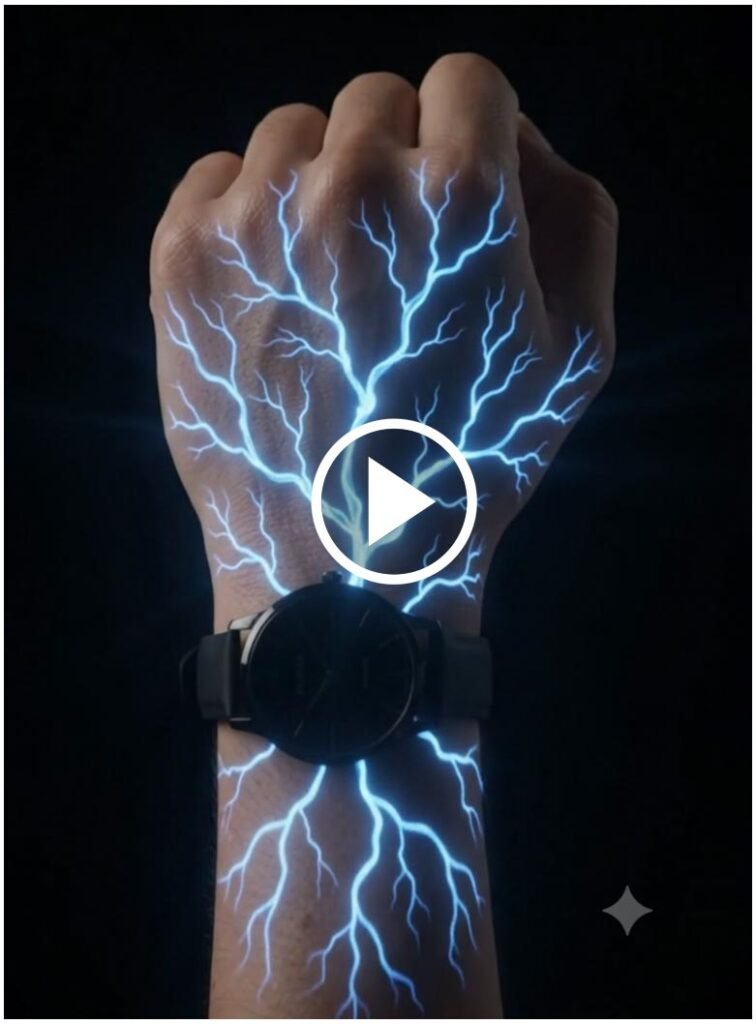
MASTER PROMPT — K NAME LOVE VFX REEL (9:16)
Create a 10-second ultra-realistic cinematic VFX video matching this exact sequence. Keep the same hand, skin tone, black wristwatch and dark background.
0–3 sec: A closed fist appears in darkness. Glowing electric-blue veins slowly spread from the wrist across the hand, branching like lightning. Intensify the glow, then zoom in for a detailed close-up.
3–4 sec: Fast cinematic camera push into the skin, transitioning seamlessly inside a realistic human blood vessel.
4–7 sec: Travel through the reddish organic blood vessel. Red blood cells float toward the camera. Small glowing cyan 3D letter “K” characters begin appearing among them and multiply rapidly.
7–9 sec: Many luminous cyan “K” letters swirl through the bloodstream toward the camera. Create strong depth, realistic motion blur and cinematic perspective.
9–10 sec: Transition back to the original fist. Show glowing blue veins covering the hand and wrist, with multiple small cyan “K” letters appearing on the skin. End on a dramatic close-up.
Style: Ultra-realistic VFX, smooth 60fps animation, cinematic zooms and tracking, detailed skin, volumetric glow, realistic blood cells, depth of field, high contrast, sharp 4K quality.
Audio: Electric energy crackle during vein activation, deep cinematic whoosh during the skin transition, subtle flowing sounds inside the blood vessel, and a final magical sparkle.
Rules: Vertical 9:16, no dialogue, no extra text, no watermark, keep the letter “K” clearly recognizable, preserve visual continuity, smooth transitions and accurate timing.
What Are AI Video Editing Prompts?
AI video editing prompts are text instructions that tell an artificial intelligence tool what kind of video, animation, camera movement, visual effects, or scene you want to create. A well-written prompt can help you achieve more consistent and creative results.
Best AI Video Editing Prompts to Create Viral Videos
Using creative AI video prompts can help you explore popular video styles for YouTube, Instagram, and other social media platforms. You can customize each prompt according to your subject, preferred style, and the AI tool you use.
1. Cinematic AI Video Prompt
Create a cinematic video featuring a dramatic atmosphere, realistic lighting, smooth camera movement, detailed textures, and professional color grading. Use natural motion and a visually engaging composition for a high-quality result.
2. AI Image-to-Video Prompt
Transform the uploaded image into a realistic animated video. Preserve the main subject’s appearance while adding natural movement, subtle camera motion, realistic lighting, and a smooth cinematic transition.
3. Viral Instagram Reels Prompt
Create a short, visually engaging vertical video with dynamic transitions, smooth motion, eye-catching visuals, and a strong opening scene. Use a 9:16 aspect ratio suitable for Instagram Reels and YouTube Shorts.
4. AI Nature Video Prompt
Generate a realistic cinematic nature video featuring beautiful landscapes, moving clouds, flowing water, natural sunlight, and smooth camera movement. Focus on realistic details and immersive scenery.
Best AI Video Generator Tools in 2026
Choosing the right AI video generator depends on your budget, creative goals, and required features. Some tools focus on generating videos from text, while others specialize in image animation, editing assistance, or professional video production.
Google Gemini
Google Gemini can help you develop video concepts, refine prompts, and explore AI-powered creative workflows. Available video-generation features depend on the product, subscription, and current availability.
ChatGPT
ChatGPT can help you write detailed AI video prompts, brainstorm creative concepts, develop scripts, and plan scenes for video projects. Video-generation capabilities depend on the tools available to your account.
Dedicated AI Video Generators
Dedicated AI video platforms can offer features such as text-to-video generation, image-to-video animation, camera movement controls, and creative effects. Compare their current features, pricing, usage limits, and commercial-use terms before choosing a tool.